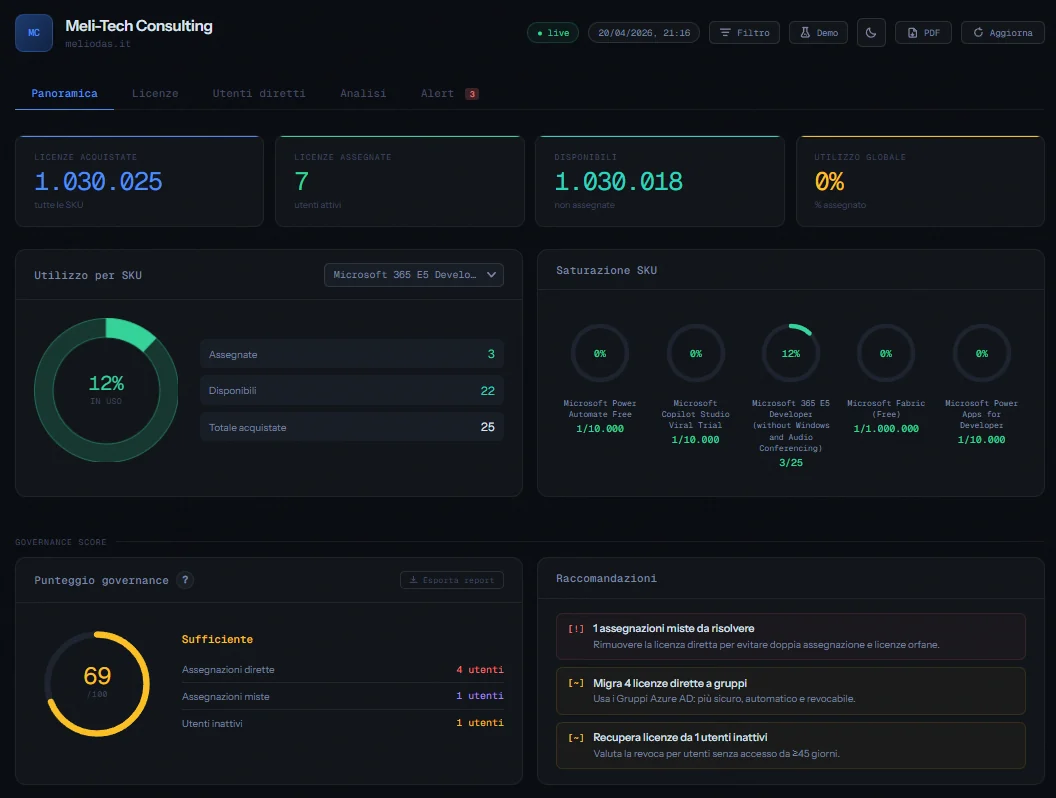
Una dashboard web per avere sempre sotto controllo le licenze Microsoft 365 di un tenant enterprise, senza aprire il portale di amministrazione, senza script manuali, senza perdere tempo.
A web dashboard to keep the Microsoft 365 licenses of an enterprise tenant always under control, without opening the admin portal, without manual scripts, without wasting time.
PowerShellGraph APIAzure FunctionsAzure Static Web AppsAzure Table StorageAzure DevOpsChart.jsOAuth 2.0
Modalità demo · dati simulati, nessun accesso MicrosoftDemo mode · simulated data, no Microsoft sign-in
01PS>Get-Content.\docs\problem.md
Il problema
The problem
In un tenant Microsoft 365 enterprise le licenze sono una delle voci di costo più rilevanti, e anche una delle più difficili da tenere sotto controllo. Il portale di amministrazione mostra i dati, ma non aggregato, non in tempo reale e non con la profondità necessaria per prendere decisioni rapide.
In an enterprise Microsoft 365 tenant, licenses are one of the most significant cost items, and one of the hardest to keep under control. The admin portal shows the data, but not aggregated, not in real time and not with the depth needed to make quick decisions.
Domande come "Quante licenze M365 sono assegnate direttamente invece che tramite gruppo?", "Ci sono utenti inattivi da mesi che consumano ancora licenze?" o "Tra quanto saturiamo il piano corrente?" richiedono normalmente query manuali su Graph API o script PowerShell eseguiti all'occorrenza.
Questions like "How many M365 licenses are assigned directly instead of through a group?", "Are there users who have been inactive for months and still consume licenses?" or "How long until we saturate the current plan?" usually require manual Graph API queries or PowerShell scripts run on demand.
Da sapereGood to know
Le licenze assegnate direttamente a un utente (invece che tramite gruppo) non vengono revocate automaticamente quando l'account viene disabilitato: continuano a essere conteggiate e fatturate. Rilevare e correggere queste situazioni può tradursi in risparmi concreti.
Licenses assigned directly to a user (instead of through a group) are not automatically revoked when the account is disabled: they keep being counted and billed. Detecting and fixing these cases can translate into real savings.
02PS>Get-Content.\docs\solution.md
La soluzione
The solution
Ho costruito una dashboard web a singolo file HTML che si connette a Microsoft Graph API tramite un backend serverless su Azure Functions e mostra in tempo reale lo stato completo delle licenze del tenant: utilizzo, assegnazioni, utenti inattivi, trend storico e alert consolidati.
I built a single-file HTML web dashboard that connects to Microsoft Graph API through a serverless backend on Azure Functions and shows the full license status of the tenant in real time: usage, assignments, inactive users, historical trend and consolidated alerts.
L'obiettivo era avere uno strumento sempre disponibile (accessibile da browser senza installare nulla, senza eseguire script manuali) che fornisse una vista centralizzata e azionabile sulle licenze M365.
The goal was an always-available tool (accessible from the browser without installing anything or running manual scripts) providing a centralized, actionable view of M365 licenses.
Come funziona
How it works
flusso di una richiesta · simulazionerequest flow · simulation
versione testualetext version
architetturaarchitecture
Browser (dashboard HTML)
│ [non autenticato] → redirect /.auth/login/aad
│ [autenticato] → accesso alla dashboard
▼Azure Static Web Apps (Easy Auth · Entra ID)
│ fetch → /api/GetM365Data
▼Azure Function (PowerShell HTTP trigger)
│ OAuth2 client credentials → access token
▼Microsoft Graph API │ GET /organization · /subscribedSkus · /users
▼Azure Function elabora i dati
│ upsert snapshot mese corrente ──► Azure Table Storage │ GET ultimi 12 mesi di storico ◄──────────────────────
▼Browser renderizza la dashboard
Browser (HTML dashboard)
│ [not signed in] → redirect /.auth/login/aad
│ [signed in] → access to the dashboard
▼Azure Static Web Apps (Easy Auth · Entra ID)
│ fetch → /api/GetM365Data
▼Azure Function (PowerShell HTTP trigger)
│ OAuth2 client credentials → access token
▼Microsoft Graph API │ GET /organization · /subscribedSkus · /users
▼Azure Function processes the data
│ upsert current month snapshot ──► Azure Table Storage │ GET last 12 months of history ◄───────────────────────
▼Browser renders the dashboard
Il frontend è un file HTML vanilla con Chart.js per i grafici: nessun framework, nessun build step. Il backend è una Azure Function in PowerShell che autentica l'app tramite OAuth 2.0 con credenziali client (app-only, senza utente interattivo) e interroga Graph API recuperando dati su licenze e utenti. I nomi leggibili delle licenze (es. "Microsoft 365 E3" invece di "ENTERPRISEPACK") vengono mappati in tempo reale scaricando il CSV ufficiale Microsoft. Ad ogni chiamata, la Function salva uno snapshot mensile su Azure Table Storage per alimentare il grafico del trend storico.
The frontend is a vanilla HTML file with Chart.js for the charts: no framework, no build step. The backend is a PowerShell Azure Function that authenticates the app via OAuth 2.0 client credentials (app-only, no interactive user) and queries Graph API for license and user data. Friendly license names (e.g. "Microsoft 365 E3" instead of "ENTERPRISEPACK") are mapped in real time by downloading Microsoft's official CSV. On every call, the Function saves a monthly snapshot to Azure Table Storage to feed the historical trend chart.
03PS>Get-ChildItem.\features
Cosa mostra la dashboard
What the dashboard shows
La dashboard è organizzata in sezioni distinte, ognuna pensata per rispondere a una domanda specifica.
The dashboard is organized into distinct sections, each designed to answer a specific question.
01
KPI globali
Global KPIs
Licenze acquistate, assegnate, disponibili e percentuale di utilizzo per ogni piano, con formattazione numerica italiana.
Purchased, assigned and available licenses and usage percentage for each plan, with Italian number formatting.
02
Grafici per SKU
Charts per SKU
Donut chart selezionabile per ogni licenza (o per tutte aggregate) con dettaglio assegnate vs disponibili e anelli di saturazione colorati.
Selectable donut chart for each license (or all of them aggregated) with assigned vs available breakdown and colored saturation rings.
03
Assegnazioni dirette e miste
Direct and mixed assignments
Elenco utenti con licenze assegnate direttamente o in modo misto (diretta + gruppo), con filtro per tipo, per SKU e ricerca real-time su nome e UPN.
List of users with licenses assigned directly or in mixed mode (direct + group), with filters by type and SKU and real-time search on name and UPN.
04
Trend mensile storico
Monthly historical trend
Grafico lineare degli ultimi 12 mesi per singola SKU o per tutte aggregate, con dati persistiti su Azure Table Storage ad ogni refresh.
Line chart of the last 12 months for a single SKU or all of them aggregated, with data persisted to Azure Table Storage on every refresh.
05
Utenti inattivi e disabilitati
Inactive and disabled users
Lista utenti senza accesso interattivo da ≥ 45 giorni con licenze a pagamento + account disabilitati con licenze ancora assegnate (badge DISABILITATO). Per ogni utente vengono mostrati separatamente accesso interattivo e non-interattivo. La soglia si applica solo al primo.
Users with no interactive sign-in for ≥ 45 days holding paid licenses + disabled accounts with licenses still assigned (DISABLED badge). Interactive and non-interactive sign-ins are shown separately for each user. The threshold only applies to the former.
06
Alert consolidati
Consolidated alerts
Tab con tutte le criticità ordinate per priorità con severity rivalutata: licenze esaurite e account disabilitati (CRIT), licenze in esaurimento, assegnazioni dirette e miste (WARN), utenti inattivi (INFO).
A tab with every issue sorted by priority with re-evaluated severity: exhausted licenses and disabled accounts (CRIT), licenses running out, direct and mixed assignments (WARN), inactive users (INFO).
07
Governance Score
Punteggio 0–100 calcolato in tempo reale in base a percentuale di assegnazioni dirette, miste e utenti inattivi, relativo alla dimensione del tenant. Include raccomandazioni dinamiche prioritizzate.
A 0–100 score calculated in real time from the percentage of direct and mixed assignments and inactive users, relative to the tenant size. Includes prioritized dynamic recommendations.
08
Confronto mese precedente
Month-over-month comparison
Delta colorati ▲▼ sui KPI principali e sul Governance Score rispetto al mese precedente. Lo snapshot è persistente in localStorage e sopravvive alla chiusura del browser.
Colored ▲▼ deltas on the main KPIs and on the Governance Score compared to the previous month. The snapshot persists in localStorage and survives closing the browser.
09
Export CSV & PDF
Export CSV su ogni sezione dati (licenze, utenti, inattivi, alert, report governance) con BOM UTF-8 per Excel. Export PDF completo dell'intera dashboard con un click, grafici inclusi.
CSV export on every data section (licenses, users, inactive, alerts, governance report) with UTF-8 BOM for Excel. Full PDF export of the whole dashboard in one click, charts included.
10
Modalità Demo
Demo mode
Toggle "Demo" nell'header che popola l'intera dashboard con dati simulati realistici: tenant "Contoso Italia", 6 SKU con stati variati, 30 utenti, 11 inattivi, Governance Score 95. Nessun dato reale esposto, nessuna scrittura in localStorage.
A "Demo" toggle in the header fills the whole dashboard with realistic simulated data: "Contoso Italia" tenant, 6 SKUs in different states, 30 users, 11 inactive, Governance Score 95. No real data exposed, nothing written to localStorage.
11
Filtro licenze visibili
Visible licenses filter
Pannello filtro nell'header con toggle per ogni SKU: scegli quali licenze includere nel calcolo. Il filtro si applica a tutti i grafici, KPI, alert, Governance Score e tabelle, ed è persistente in localStorage. In modalità Demo il filtro reale viene preservato e ripristinato automaticamente all'uscita.
A filter panel in the header with a toggle for each SKU: choose which licenses to include in the calculations. The filter applies to all charts, KPIs, alerts, Governance Score and tables, and persists in localStorage. In Demo mode the real filter is preserved and automatically restored on exit.
12
Import dati storici
Historical data import
Modal con due tab per popolare il grafico trend con dati passati: inserimento manuale per SKU/mese o upload CSV con preview e template scaricabile. I dati vengono inviati via POST alla Function e persistiti su Azure Table Storage tramite upsert.
A two-tab modal to fill the trend chart with past data: manual entry per SKU/month or CSV upload with preview and a downloadable template. Data is sent via POST to the Function and persisted to Azure Table Storage via upsert.
In piùAlso included
La dashboard include anche dark/light mode, modalità demo con dati simulati per presentazioni, filtro licenze visibili persistente, import dati storici con modal (inserimento manuale o CSV), layout responsive mobile con filter panel bottom sheet e dropdown a posizione fissa, refresh automatico all'avvio, stato connessione in tempo reale, risoluzione automatica del nome dei gruppi Entra ID, asset self-hosted (font e Chart.js, nessuna dipendenza CDN), custom dropdown con animazione marquee, favicon SVG inline e autenticazione Microsoft obbligatoria via Azure Static Web Apps Easy Auth.
The dashboard also includes dark/light mode, demo mode with simulated data for presentations, a persistent visible licenses filter, historical data import via modal (manual entry or CSV), a mobile responsive layout with a bottom-sheet filter panel and fixed-position dropdowns, automatic refresh on load, real-time connection status, automatic resolution of Entra ID group names, self-hosted assets (fonts and Chart.js, no CDN dependencies), a custom dropdown with marquee animation, an inline SVG favicon and mandatory Microsoft sign-in via Azure Static Web Apps Easy Auth.
04PS>Get-Content.\stack.json|ConvertFrom-Json
Stack tecnico
Tech stack
Il progetto è volutamente minimalista lato dipendenze: tutto quello che serve è già nell'ecosistema Azure e Microsoft.
The project is deliberately minimal on dependencies: everything it needs is already in the Azure and Microsoft ecosystem.
AutenticazioneAuthentication
Backend
CI/CD
Frontend
L4
Frontend
HTML / CSS / JavaScriptChart.js (self-hosted)Azure Static Web Apps
Single file HTML senza framework né build tool. Chart.js e i font (Geist Mono, Instrument Sans) sono self-hosted nel repository: nessuna dipendenza da CDN esterni, tutti i file provengono dall'infrastruttura Azure. Il deploy è automatico tramite Azure Static Web Apps, con supporto sia per GitHub Actions che per Azure Pipelines.
A single HTML file with no framework or build tool. Chart.js and the fonts (Geist Mono, Instrument Sans) are self-hosted in the repository: no dependency on external CDNs, every file comes from the Azure infrastructure. Deployment is automatic through Azure Static Web Apps, supporting both GitHub Actions and Azure Pipelines.
L3
CI/CD
GitHub ActionsAzure PipelinesAzure Repos
Il progetto supporta due modalità di deployment: tramite GitHub + GitHub Actions (setup predefinito) oppure interamente nell'ecosistema Microsoft con Azure Repos e Azure Pipelines, utile per tenant cliente dove i dati devono rimanere all'interno dell'infrastruttura Microsoft.
The project supports two deployment modes: GitHub + GitHub Actions (default setup) or entirely within the Microsoft ecosystem with Azure Repos and Azure Pipelines, useful for customer tenants where data must stay inside the Microsoft infrastructure.
Una singola Azure Function HTTP trigger in PowerShell agisce da proxy autenticato verso Graph API. L'autenticazione avviene tramite flusso OAuth 2.0 con credenziali client (client ID, secret e tenant ID), senza utente interattivo. Ad ogni invocazione, la Function salva uno snapshot mensile su Azure Table Storage tramite REST API diretta con autenticazione SharedKeyLite, senza moduli PowerShell aggiuntivi. Il piano Consumption garantisce costi vicini a zero per utilizzo normale.
A single PowerShell HTTP-trigger Azure Function acts as an authenticated proxy to Graph API. Authentication uses the OAuth 2.0 client credentials flow (client ID, secret and tenant ID), with no interactive user. On every invocation, the Function saves a monthly snapshot to Azure Table Storage by calling the REST API directly with SharedKeyLite authentication, with no extra PowerShell modules. The Consumption plan keeps costs close to zero for normal use.
L1
Autenticazione
Authentication
Microsoft Entra ID App RegistrationApplication PermissionsAdmin ConsentEasy Auth (Azure SWA)
Il progetto utilizza due App Registration distinte su Microsoft Entra ID. La prima gestisce l'accesso backend a Graph API tramite quattro permessi Application: Organization.Read.All, Directory.Read.All, User.Read.All e AuditLog.Read.All, tutti con Admin Consent. La seconda gestisce il login degli utenti tramite Azure Static Web Apps Easy Auth: ogni visitatore deve autenticarsi con un account Microsoft prima di accedere alla dashboard.
The project uses two separate App Registrations in Microsoft Entra ID. The first handles backend access to Graph API through four Application permissions: Organization.Read.All, Directory.Read.All, User.Read.All and AuditLog.Read.All, all with Admin Consent. The second handles user sign-in through Azure Static Web Apps Easy Auth: every visitor has to sign in with a Microsoft account before accessing the dashboard.
PowerShell · autenticazione Graph APIPowerShell · Graph API authentication
# Recupero token OAuth2 con client credentials# Get an OAuth2 token with client credentials$body = @{
grant_type = "client_credentials"
client_id = $env:CLIENT_ID
client_secret = $env:CLIENT_SECRET
scope = "https://graph.microsoft.com/.default"
}
$token = (Invoke-RestMethod `
"https://login.microsoftonline.com/$env:TENANT_ID/oauth2/v2.0/token" `
-Method POST `
-Body $body).access_token
# Lettura licenze del tenant# Read the tenant licenses$skus = (Invoke-RestMethod `
"https://graph.microsoft.com/v1.0/subscribedSkus" `
-Headers @{ Authorization = "Bearer $token" }).value
05PS>Get-History
Cosa ho imparato
What I learned
Costruire questo progetto da zero mi ha fatto toccare con mano alcuni aspetti dell'ecosistema Microsoft cloud che normalmente si gestiscono solo tramite portale. In particolare:
Building this project from scratch gave me hands-on experience with aspects of the Microsoft cloud ecosystem that are normally handled only through the portal. In particular:
Il flusso OAuth 2.0 Client Credentials: capire come un'app si autentica senza utente interattivo, come funziona il token e come gestire i permessi Application vs Delegated su Graph API.The OAuth 2.0 Client Credentials flow: understanding how an app authenticates without an interactive user, how the token works and how to handle Application vs Delegated permissions on Graph API.
La struttura dei dati licenze in Graph: il campo licenseAssignmentStates per ogni utente e la distinzione tra assegnazione diretta e da gruppo non è immediata da leggere, richiede un po' di parsing.The structure of license data in Graph: each user's licenseAssignmentStates field and the distinction between direct and group-based assignment aren't immediately readable and need some parsing.
Azure Functions in PowerShell: come strutturare una function HTTP trigger, come passare variabili d'ambiente in modo sicuro e come gestire CORS per permettere le chiamate dal frontend.Azure Functions in PowerShell: how to structure an HTTP-trigger function, how to pass environment variables securely and how to handle CORS to allow calls from the frontend.
Sign-in activity: interattivo vs non-interattivo: Graph API espone due date di accesso distinte per ogni utente. Ho capito la differenza pratica: un token refresh automatico (SSO, servizio in background) aggiorna il dato non-interattivo ma non quello interattivo. Usare solo quest'ultimo per la soglia di inattività è la scelta corretta per identificare utenti che non aprono più le app Microsoft, pur mantenendo entrambi i valori visibili a schermo.Sign-in activity: interactive vs non-interactive: Graph API exposes two separate sign-in dates for each user. I learned the practical difference: an automatic token refresh (SSO, background service) updates the non-interactive date but not the interactive one. Using only the latter for the inactivity threshold is the right choice to identify users who no longer open Microsoft apps, while keeping both values visible on screen.
Governance degli account disabilitati: un account disabilitato in Entra ID non rilascia automaticamente le licenze assegnate direttamente. Rilevare e segnalare questi casi nella dashboard traduce un problema di governance spesso invisibile in un'azione concreta e misurabile.Governance of disabled accounts: an account disabled in Entra ID does not automatically release directly assigned licenses. Detecting and flagging these cases in the dashboard turns an often invisible governance problem into a concrete, measurable action.
Azure Table Storage via REST API diretta: per lo storico del trend ho implementato l'autenticazione SharedKeyLite con HMAC-SHA256 in puro PowerShell, senza dipendere da moduli esterni. Un esercizio utile per capire come funziona l'autenticazione a livello di protocollo nei servizi Azure Storage.Azure Table Storage via the REST API: for the trend history I implemented SharedKeyLite authentication with HMAC-SHA256 in pure PowerShell, without depending on external modules. A useful exercise to understand how authentication works at protocol level in Azure Storage services.
Il deploy automatico con Azure Static Web Apps: ogni push su GitHub aggiorna il sito in automatico tramite GitHub Actions, senza deploy manuale.Automatic deployment with Azure Static Web Apps: every push to GitHub updates the site automatically through GitHub Actions, with no manual deployment.
Migrazione a Azure DevOps: come spostare un progetto interamente nell'ecosistema Microsoft (Azure Repos + Azure Pipelines) per scenari enterprise dove i dati non devono uscire dall'infrastruttura del cliente.Migrating to Azure DevOps: how to move a project entirely into the Microsoft ecosystem (Azure Repos + Azure Pipelines) for enterprise scenarios where data must not leave the customer's infrastructure.
Proteggere una web app con Entra ID Easy Auth: come aggiungere autenticazione Microsoft a una Static Web App tramite staticwebapp.config.json, con la distinzione pratica tra il provider built-in (piano Free) e l'app registration custom (piano Standard).Protecting a web app with Entra ID Easy Auth: how to add Microsoft authentication to a Static Web App through staticwebapp.config.json, with the practical difference between the built-in provider (Free plan) and a custom app registration (Standard plan).
Import dati storici su Table Storage via REST: implementazione di un handler POST nella Function che riceve dati JSON e li persiste su Azure Table Storage con upsert (PUT), usando la stessa autenticazione SharedKeyLite già presente per la lettura, senza dipendenze aggiuntive.Importing historical data into Table Storage via REST: a POST handler in the Function that receives JSON data and persists it to Azure Table Storage with an upsert (PUT), using the same SharedKeyLite authentication already used for reading, with no additional dependencies.
06PS>Get-Content.\ROADMAP.md
Sviluppi futuri
What's next
Il progetto è funzionante e in continua evoluzione. I miglioramenti ancora in cantiere:
The project works and keeps evolving. Improvements still in the pipeline:
BacklogBacklog4 attivitàtasks+
Rimozione della Function Key dal frontend: sostituzione con Managed Identity o token Entra ID.Removing the Function Key from the frontend: replacing it with a Managed Identity or an Entra ID token.
Deploy automatico di run.ps1 tramite GitHub Actions (attualmente aggiornato manualmente dal portale Azure).Automatic deployment of run.ps1 through GitHub Actions (currently updated manually from the Azure portal).
Notifiche automatiche via Teams Webhook quando una licenza si avvicina alla saturazione.Automatic notifications via Teams Webhook when a license gets close to saturation.
Soglia di inattività configurabile dall'interfaccia (attualmente fissa a 45 giorni).Inactivity threshold configurable from the interface (currently fixed at 45 days).
Nel tuo tenantIn your tenant
Se volete implementare la dashboard nel vostro tenant per visualizzare i vostri dati reali, contattatemi via email o tramite i social che trovate nel portfolio. Sarò felice di aiutarvi.
If you'd like to deploy the dashboard in your own tenant to see your real data, contact me by email or through the socials you'll find in the portfolio. I'll be happy to help.