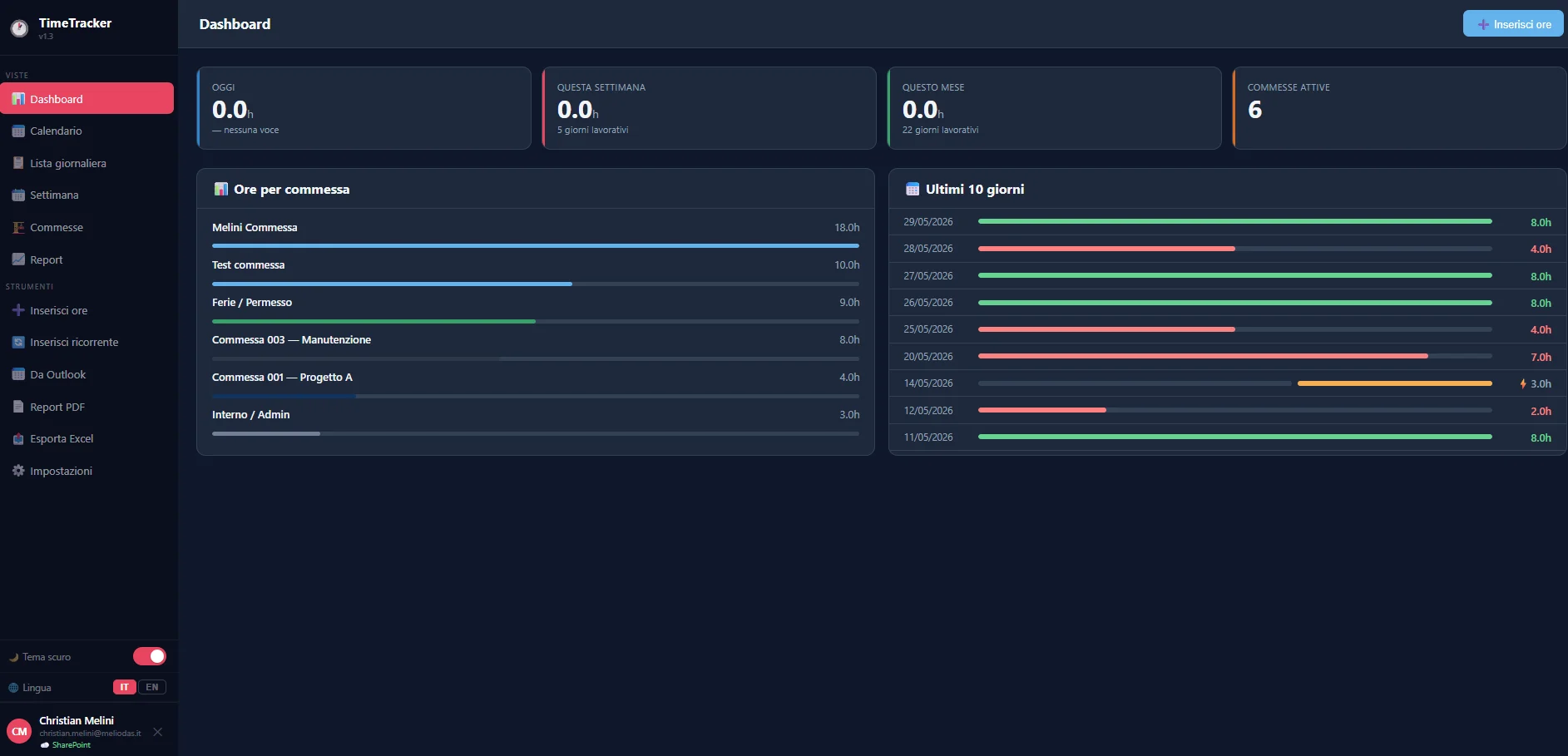
Un'app web per il tracciamento delle ore lavorative per team aziendali, con calendario interattivo, integrazione SharePoint, importazione da Outlook e report PDF. Tutto in un singolo file HTML, senza backend, senza installazioni.
A web app for tracking working hours in company teams, with an interactive calendar, SharePoint integration, Outlook import and PDF reports. All in a single HTML file, with no backend and nothing to install.
Modalità demo · dati simulati, nessun accesso MicrosoftDemo mode · simulated data, no Microsoft sign-in
01PS>Get-Content.\docs\problem.md
Il problema
The problem
In un team IT di consulenza, consuntivare le ore su ogni commessa è un'attività quotidiana obbligatoria, ma spesso viene gestita con strumenti non pensati per questo: fogli Excel condivisi, form SharePoint grezzi, note sparse. Il risultato è che a fine mese mancano sempre dati, si perde tempo a ricostruire cosa si è fatto e i report per il management diventano un esercizio di pazienza.
In an IT consulting team, logging hours against each project is a mandatory daily task, but it is often handled with tools not designed for it: shared Excel sheets, bare SharePoint forms, scattered notes. The result is that data is always missing at the end of the month, time is wasted reconstructing what was done, and reports for management become an exercise in patience.
Gli strumenti commerciali come Clockify o Toggl esistono, ma in contesti enterprise spesso non si possono adottare per motivi di compliance o di governance dei dati. Serviva qualcosa che girasse sull'infrastruttura Microsoft già in uso, senza dipendenze esterne e senza richiedere approvazioni IT complesse.
Commercial tools like Clockify or Toggl exist, but in enterprise contexts they often can't be adopted for compliance or data governance reasons. What was needed was something running on the Microsoft infrastructure already in use, with no external dependencies and no complex IT approvals.
Da sapereGood to know
I dati delle ore restano su SharePoint Online del tenant aziendale: nessun dato esce verso servizi di terze parti. L'autenticazione avviene tramite Azure AD con lo stesso account Microsoft 365 già in uso.
Hours data stays in the company tenant's SharePoint Online: no data leaves to third-party services. Authentication goes through Azure AD with the same Microsoft 365 account already in use.
02PS>Get-Content.\docs\solution.md
La soluzione
The solution
Ho costruito un'app web a singolo file HTML che si autentica tramite MSAL Browser con l'account Microsoft aziendale e salva ogni voce direttamente su una lista SharePoint Online tramite Microsoft Graph API. Nessun backend, nessun server intermedio: il browser chiama Graph API direttamente, con token OAuth 2.0 acquisito in modo silenzioso.
I built a single-file HTML web app that authenticates via MSAL Browser with the corporate Microsoft account and saves each entry directly to a SharePoint Online list through Microsoft Graph API. No backend, no intermediate server: the browser calls Graph API directly, with an OAuth 2.0 token acquired silently.
Il deploy è su Cloudflare Pages con auto-deploy da GitHub: ogni aggiornamento del file HTML viene pubblicato automaticamente in 30-60 secondi. Il fallback è localStorage: se SharePoint non è raggiungibile, l'app continua a funzionare offline e si risincronizza appena la connessione torna.
It's deployed on Cloudflare Pages with auto-deploy from GitHub: every update to the HTML file goes live automatically in 30–60 seconds. The fallback is localStorage: if SharePoint can't be reached, the app keeps working offline and resyncs as soon as the connection is back.
Come funziona
How it works
flusso di una richiesta · simulazionerequest flow · simulation
Browser (TimeTracker, single HTML file)
│ [not signed in] → Microsoft login popup
│ [signed in] → silent MSAL token
▼MSAL Browser (Azure AD, delegated flow)
│ acquireTokenSilent / acquireTokenPopup
│ scopes: Sites.ReadWrite.All · User.Read · Calendars.Read
▼Microsoft Graph API │ GET/POST/PATCH/DELETE /sites/{site}/lists/{list}/items
│ GET /me/calendarview (Outlook event import)
▼SharePoint Online (OreCommesse list)
│ local cache ──► localStorage (offline fallback)
▼Browser renders calendar, dashboard and reports
Ogni voce salvata contiene: data, ore, orario di inizio e fine, commessa, attività, flag straordinario, note, nome utente ed email. Il filtro per email garantisce che ogni utente veda solo le proprie ore: più persone possono usare la stessa lista SharePoint senza interferenze.
Each saved entry contains: date, hours, start and end time, project, activity, overtime flag, notes, user name and email. Filtering by email ensures each user only sees their own hours: several people can use the same SharePoint list without interfering with each other.
03PS>Get-ChildItem.\features
Funzionalità
Features
L'app è organizzata in sezioni distinte, ognuna pensata per rispondere a un'esigenza concreta del lavoro quotidiano.
The app is organized into distinct sections, each designed for a concrete need of daily work.
01
Calendario multi-vista
Multi-view calendar
Cinque viste: Mese, Settimana lavorativa, Settimana completa, Giorno e Agenda. Griglia 24h con blocchi posizionati all'orario esatto e drag-and-drop con snap ogni 30 minuti.
Five views: Month, Work week, Full week, Day and Agenda. A 24h grid with blocks placed at the exact time and drag-and-drop snapping every 30 minutes.
02
Festivi italiani automatici
Automatic Italian holidays
Pasqua e Pasquetta calcolate algoritmicamente per ogni anno. Tutti i festivi nazionali evidenziati nel calendario, esclusi dall'inserimento ricorrente e dal conteggio ore mancanti.
Easter and Easter Monday calculated algorithmically for every year. All national holidays highlighted in the calendar and excluded from recurring entries and from the missing-hours count.
03
Inserimento ricorrente
Recurring entries
Inserisce la stessa voce su tutti i giorni lavorativi di un periodo, saltando weekend e festivi. Anteprima live e gestione conflitti con scelta di saltare i giorni occupati.
Adds the same entry on every working day of a period, skipping weekends and holidays. Live preview and conflict handling with the option to skip busy days.
04
Importazione da Outlook
Outlook import
Carica eventi dal calendario Outlook via Graph API per un periodo selezionato. Controllo automatico di duplicati, sovrapposizioni e limite ore giornaliero prima dell'importazione.
Loads events from the Outlook calendar via Graph API for a selected period. Automatic checks for duplicates, overlaps and the daily hours limit before importing.
05
Pausa pranzo automatica
Automatic lunch break
Intervallo configurabile (default 13:00-14:00) saltato automaticamente nel calcolo dell'orario di fine e nell'auto-split. Visualizzato come blocco decorativo nel calendario.
A configurable interval (default 13:00–14:00) automatically skipped when calculating the end time and in auto-split. Shown as a decorative block in the calendar.
06
Budget ore per commessa
Hours budget per project
Ogni commessa ha un tetto massimo configurabile. Barra di avanzamento colorata (verde/arancione/rosso) nella tab Commesse e nel tab Report con ore usate e rimanenti.
Each project has a configurable maximum. A colored progress bar (green/orange/red) in the Projects tab and in the Report tab with hours used and remaining.
07
Export PDF e Excel
PDF and Excel export
Report PDF mensile in A4 landscape con tabella completa e riepilogo per commessa. Export Excel su tre fogli: Dettaglio, Per commessa e Mensile.
Monthly PDF report in A4 landscape with the full table and a per-project summary. Excel export on three sheets: Detail, By project and Monthly.
08
Tab Report
Report tab
Ore rimanenti su progetto, giorni lavorativi del mese con ore mancanti da consuntivare (esclusi festivi), consuntivazioni effettuate con selettore mese/anno dal 2025.
Remaining project hours, working days of the month with hours still to log (holidays excluded), completed timesheets with a month/year selector from 2025.
09
Cache offline automatica
Automatic offline cache
Ogni operazione aggiorna anche il localStorage. Se SharePoint non è raggiungibile, l'app carica i dati dalla cache locale e si risincronizza automaticamente al ripristino.
Every operation also updates localStorage. If SharePoint can't be reached, the app loads data from the local cache and resyncs automatically once it's back.
10
Backup & ripristino ore
Hours backup & restore
Export/Import JSON di tutte le voci, utile per backup completi o migrazione tra tenant diversi. Controllo automatico dei duplicati prima dell'inserimento.
JSON export/import of all entries, useful for full backups or migrating between tenants. Automatic duplicate check before inserting.
11
Orologio SVG animato
Animated SVG clock
Schermata di login con orologio SVG in tempo reale, con lancette calcolate in JavaScript al millisecondo, senza immagini o GIF esterne.
A login screen with a real-time SVG clock, with hands calculated in JavaScript to the millisecond, with no external images or GIFs.
12
Commesse e attività configurabili
Configurable projects and activities
Ogni commessa ha nome, colore, attività collegate e budget ore. Export/Import della configurazione in JSON per portarla tra dispositivi o browser diversi.
Each project has a name, color, linked activities and an hours budget. JSON export/import of the configuration to move it between devices or browsers.
In piùAlso included
L'app include anche auto-split degli orari (una voce che copre la pausa pranzo viene divisa automaticamente in due), validazione sovrapposizioni, drag-and-drop nel calendario con salvataggio immediato su SharePoint, dark/light mode, lingua IT/EN, date picker custom con tastiera, paginazione nella lista giornaliera e modalità demo senza credenziali configurate.
The app also includes auto-split of time ranges (an entry spanning the lunch break is automatically split in two), overlap validation, calendar drag-and-drop with immediate saving to SharePoint, dark/light mode, IT/EN language, a custom date picker with keyboard support, pagination in the daily list and a demo mode with no configured credentials.
04PS>Get-Content.\stack.json|ConvertFrom-Json
Stack tecnico
Tech stack
Il progetto è volutamente minimalista lato dipendenze: tutto in un singolo file HTML, senza framework né build step.
The project is deliberately minimal on dependencies: everything in a single HTML file, with no framework or build step.
Single file HTML senza framework. Tutto il CSS è inline, tutto il JS è vanilla. Il calendario, le viste colonna, il date picker e i modal sono costruiti da zero senza dipendenze UI.
A single HTML file with no framework. All CSS is inline, all JS is vanilla. The calendar, column views, date picker and modals are built from scratch with no UI dependencies.
L4
Autenticazione e API
Authentication and APIs
MSAL Browser 2.38.3Microsoft Graph APIOAuth 2.0 DelegatedAzure AD App Registration
L'autenticazione avviene tramite flusso OAuth 2.0 delegato: l'utente si autentica con il proprio account Microsoft, MSAL acquisisce il token e il browser chiama Graph API direttamente. I permessi richiesti sono Sites.ReadWrite.All, User.Read e Calendars.Read.
Authentication uses the delegated OAuth 2.0 flow: the user signs in with their own Microsoft account, MSAL acquires the token and the browser calls Graph API directly. The required permissions are Sites.ReadWrite.All, User.Read and Calendars.Read.
I dati vengono salvati su una lista SharePoint Online (OreCommesse) tramite le API REST di Graph. Ad ogni operazione riuscita, localStorage viene aggiornato come cache offline: se SharePoint non è raggiungibile al reload, l'app usa i dati locali senza interruzioni.
Data is saved to a SharePoint Online list (OreCommesse) through Graph's REST APIs. After every successful operation, localStorage is updated as an offline cache: if SharePoint can't be reached on reload, the app uses the local data without interruption.
L2
Librerie esterne (CDN)
External libraries (CDN)
SheetJS 0.18.5jsPDF 2.5.1jsPDF-AutoTable 3.5.28
L1
Hosting & CI/CD
Cloudflare PagesGitHub (auto-deploy)
Ogni push su GitHub aggiorna il sito in automatico tramite Cloudflare Pages in 30-60 secondi, senza pipeline complesse e senza build step.
Every push to GitHub updates the site automatically through Cloudflare Pages in 30–60 seconds, with no complex pipelines and no build step.
JavaScript · autenticazione MSAL e chiamata Graph APIJavaScript · MSAL authentication and Graph API call
// Acquisizione token silenzioso (senza popup se la sessione è attiva)// Silent token acquisition (no popup if the session is active)const tokenResponse = await msalApp.acquireTokenSilent({
scopes: ['Sites.ReadWrite.All', 'User.Read', 'Calendars.Read'],
account
}).catch(() =>
msalApp.acquireTokenPopup({ scopes, account })
);
// Lettura voci dalla lista SharePoint// Read entries from the SharePoint listconst res = awaitfetch(
`https://graph.microsoft.com/v1.0/sites/${spSite}/lists/${spList}/items?$expand=fields&$filter=fields/UtenteEmail eq '${email}'`,
{ headers: { Authorization: `Bearer ${tokenResponse.accessToken}` } }
);
// Salvataggio nuova voce// Save a new entryawaitfetch(
`https://graph.microsoft.com/v1.0/sites/${spSite}/lists/${spList}/items`,
{
method: 'POST',
headers: {
Authorization: `Bearer ${tokenResponse.accessToken}`,
'Content-Type': 'application/json'
},
body: JSON.stringify({
fields: { DataOre, Ore, Commessa, Attivita, Straordinario, OraInizio, OraFine, Note, Utente, UtenteEmail }
})
}
);
05PS>Get-History
Cosa ho imparato
What I learned
Costruire questo tool da zero, con requisiti reali e uso quotidiano da parte di un team, ha messo alla prova ogni decisione tecnica in condizioni reali. In particolare:
Building this tool from scratch, with real requirements and daily use by a team, put every technical decision to the test in real conditions. In particular:
Il flusso OAuth 2.0 Delegated con MSAL Browser: la differenza tra acquireTokenSilent e acquireTokenPopup, la gestione del refresh token e come evitare popup indesiderati quando la sessione è ancora valida.The delegated OAuth 2.0 flow with MSAL Browser: the difference between acquireTokenSilent and acquireTokenPopup, refresh token handling and how to avoid unwanted popups while the session is still valid.
Graph API per le liste SharePoint: le API REST di SharePoint tramite Graph hanno comportamenti diversi rispetto alle API Files: le colonne vanno create manualmente o via provisioning, alcuni tipi (DateTime, Boolean) richiedono formati specifici, e le colonne opzionali vanno gestite con fallback per i tenant dove non esistono.Graph API for SharePoint lists: SharePoint's REST APIs through Graph behave differently from the Files APIs: columns have to be created manually or via provisioning, some types (DateTime, Boolean) require specific formats, and optional columns need fallbacks for tenants where they don't exist.
Architettura offline-first con localStorage: tenere localStorage sempre sincronizzato con SharePoint (non solo in fallback) richiede di aggiornare la cache ad ogni operazione riuscita, non solo al caricamento iniziale.Offline-first architecture with localStorage: keeping localStorage always in sync with SharePoint (not only as a fallback) means updating the cache after every successful operation, not just on initial load.
Auto-split degli orari: l'algoritmo che divide automaticamente una voce nei slot liberi del giorno (saltando voci esistenti e la pausa pranzo virtuale) ha richiesto diversi cicli di correzione per gestire edge case come l'ordine dei blocchi, i buchi multipli e il calcolo delle ore parziali.Auto-splitting time ranges: the algorithm that automatically splits an entry into the free slots of the day (skipping existing entries and the virtual lunch break) took several rounds of fixes to handle edge cases like block order, multiple gaps and partial hours calculation.
06PS>Get-Content.\ROADMAP.md
Sviluppi futuri
What's next
Il progetto è in uso quotidiano e in continua evoluzione. Le funzionalità ancora in cantiere:
The project is in daily use and keeps evolving. Features still in the pipeline:
BacklogBacklog4 attivitàtasks+
Timer live: bottone "Avvia" che conta i secondi in tempo reale e crea la voce automaticamente allo stop.Live timer: a "Start" button that counts seconds in real time and creates the entry automatically on stop.
Pill cliccabili nella vista Mese: apertura del modal di modifica/elimina direttamente dalla cella del giorno.Clickable pills in the Month view: opening the edit/delete modal directly from the day cell.
Notifiche browser: promemoria automatico se a fine giornata non sono state inserite ore.Browser notifications: an automatic reminder if no hours have been logged by the end of the day.
Vista manager: possibilità per un utente admin di visualizzare le ore di tutto il team in una vista aggregata.Manager view: lets an admin user see the whole team's hours in an aggregated view.
Nel tuo tenantIn your tenant
Se sei interessato a implementare il TimeTracker nel tuo tenant o vuoi saperne di più, scrivimi via email o tramite i social nel portfolio.
If you're interested in deploying the TimeTracker in your tenant or want to know more, write to me by email or through the socials in the portfolio.